using System;
using System.Collections;
using System.Collections.Generic;
using UnityEngine;

public enum ItemType
{
    Equipable,
    Consumable,
    Resource
}

public enum ConsumableType
{
    Health,
    Hunger
}

[Serializable]

public class ItemDataConsumable
{
    public ConsumableType type;
    public float value;
}

[CreateAssetMenu(fileName = "Item", menuName = "new Item")]//새로만들기창에 생성
public class ItemData : ScriptableObject
{
    [Header("Info")]
    public string displayName;
    public string description;
    public ItemType type;
    public Sprite icon;
    public GameObject dropPrefab;

    [Header("Stacking")]
    public bool canStack;
    public int maxStackAmount;

    [Header("Consumable")]
    public ItemDataConsumable[] consumables;
}
스크립터블 오브젝트
주목할것은 ItemDataConsumable[] 클래스 객체를 배열로 선언해준뒤 ItemDataConsumable에 직렬화 속성을 부여하여 inspector 창에서 수정할수있게 한 점이다 이를통해
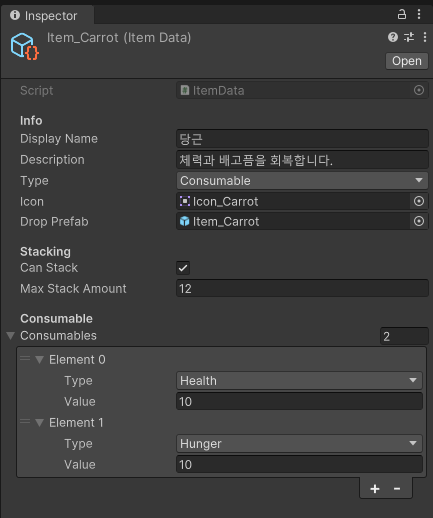
아이템 데이터에서 같은 클래스의 요소가 여러개 붙는 경우를 처리 할수있게 된다.
델리게이트 활용
public class Player : MonoBehaviour
{
    public PlayerController controller;
    public PlayerCondition condition;

    public ItemData itemData;
    public Action addItem;

    public Transform dropPosition;

    private void Awake()
    {
        CharacterManager.Instance.Player = this;
        controller = GetComponent<PlayerController>();
        condition = GetComponent<PlayerCondition>();
    }
}
UIInventory
    private void Start()
    {
        controller = CharacterManager.Instance.Player.controller;
        condition = CharacterManager.Instance.Player.condition;
        dropPosition = CharacterManager.Instance.Player.dropPosition;

        controller.inventory += Toggle;
        CharacterManager.Instance.Player.addItem += Additem;

        inventoryWindow.SetActive(false);
        slots = new ItemSlot[slotPanel.childCount];

        for (int i = 0; i < slots.Length; i++)
        {
            slots[i] = slotPanel.GetChild(i).GetComponent<ItemSlot>();
            slots[i].index = i;
            slots[i].inventory = this;
        }

        ClearSelectedItemWindow();
    }
현재 UIInventory에서는 charactermanager를 통해 Player 클래스에 접근할수 있지만 반대로는 접근할수없는 상황이다.
그러나 player 클래스의 additem 델리게이트에 접근하여 UIInventory의 Additem 메서드를 추가해주어 player 클래스에서도 UIInventory의 메서드를 실행할 수 있게 하였다.
추가로 start에서 델리게이트에 메서드를 추가할경우 메서드 실행순서는 추가한 순서대로 실행되는데 이때 각기 다른클래스에서 추가할수도 있다. 그럴 경우 hierarchy창 기준 위에서부터 순서대로 각 클래스의 start를 실행하게 되므로 그에 맞는 순서대로 실행되게 된다.